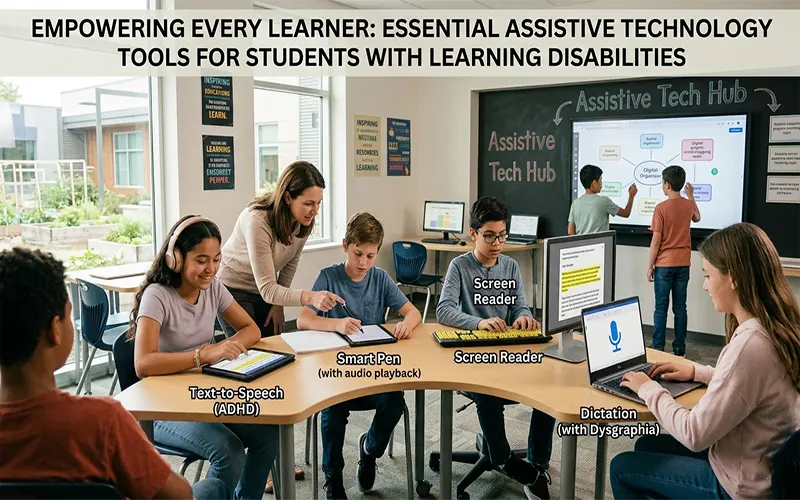
In the modern classroom, the goal of education is not simply to deliver a standardized curriculum, but to unlock the potential of every unique mind. For students with learning disabilities—such as dyslexia, dysgraphia, or executive function challenges—traditional educational materials can sometimes act as barriers rather than bridges. Assistive Technology (AT) serves to dismantle these barriers. When we integrate the right digital tools, we stop asking students to work harder to overcome a format and instead empower them to focus on the content, demonstrating their true intelligence, creativity, and capability.
Categorizing the Toolbox
To effectively implement AT, it is helpful to categorize tools based on the specific barriers they address, rather than the student’s diagnosis.
- Reading Support: For students with dyslexia or visual processing differences, reading can be an exhausting endeavor that prevents them from engaging with complex ideas. Tools like Immersive Reader (integrated into Microsoft 365) and dedicated apps like Speechify provide high-quality text-to-speech (TTS), allowing students to listen to content while following along. These tools often include features like increased line spacing, specialized fonts (such as OpenDyslexic), and digital highlighters, all of which help to minimize cognitive load.
- Writing Support: Dysgraphia or difficulties with motor coordination can make writing a painful, slow, and frustrating process. Speech-to-text (dictation) software has evolved significantly, now offering near-perfect accuracy for classroom discourse. When paired with word prediction software and digital graphic organizers (like MindMeister), students can focus on the structure and quality of their arguments rather than the mechanics of letter formation or spelling.
- Executive Functioning: Students with ADHD or other executive function challenges often struggle with task initiation, time management, and organization. Digital task managers like Trello or Notion allow students to break large projects into smaller, manageable steps. Meanwhile, simple visual timer apps and focus-based browser extensions—which block distracting sites during study hours—help students maintain the momentum needed to complete multi-step assignments.
The Philosophy of Universal Design
One of the most important shifts in modern education is the move toward Universal Design for Learning (UDL). UDL posits that technology should not be an “add-on” for the few, but a standard feature of the classroom for the many. When a teacher provides a digital text, the ability to change the font size or turn on text-to-speech shouldn’t be reserved only for students with an Individualized Education Program (IEP).
By making these tools available to the entire class, we achieve two things: we normalize the use of assistive technology, drastically reducing the stigma often felt by students with learning differences, and we discover that “assistive” tools are often “productive” tools for everyone. A student without a diagnosis may find that listening to a dense textbook passage while following the text improves their own comprehension, just as a student with dyslexia does.
Implementation and Advocacy
Matching the right tool to the right student is a process that requires partnership. It is rarely effective to force a tool upon a student; instead, engage the student in the selection process. Implement a “trial period” where the student uses a new tool for a specific task and then provides feedback. Ask them: Did this make the work easier? Did it help you feel more confident? If a tool causes more frustration than it resolves, discard it. Advocacy, in this context, means being the student’s champion in finding the digital interface that feels like an extension of their own thinking.
Future Outlook
As we move further into 2026, the potential for AI-powered assistive technology is transformative. We are entering an era of “on-demand” accessibility, where generative AI can instantly summarize lengthy articles into bullet points, rephrase complex sentences into simpler language, or act as a supportive study partner that explains concepts in a way that matches a student’s individual learning style. These innovations are finally leveling the playing field, ensuring that a learning disability does not limit a student’s academic or professional trajectory. By embracing these tools, we are not just helping students “get by”—we are giving them the keys to unlock their own brilliance.
Tool-to-Need Mapping Table
| Learning Barrier | Primary AT Solution | Example Tools |
| Decoding/Reading | Text-to-Speech & Visual Adjustments | Immersive Reader, Speechify |
| Written Expression | Dictation & Word Prediction | Dictate (M365), Google Voice Typing |
| Organization/Planning | Visual Mapping & Task Management | Trello, MindMeister, Notion |
| Executive Function | Focus Management & Time Tracking | Focus@Will, Forest, Visual Timers |
| Cognitive Load | AI Summarization & Simplification | ChatGPT, Claude (Custom Prompts) |